
Layout of your workstation
The following recommendations apply to both fixed and teleworking workstations. You can also find SUVA's 7 tips for ergonomic workstations online.
NB : The seat is adjusted before the rest.
SEAT
- The back of the thighs rest on the seat (only a few cm protrude)
- Thighs and bust form an angle of 90 degrees or more
- Feet flat on the ground (or on a footrest if not touching the ground)

TABLE
- Enough space under the worktop for legs
- Table height at elbow height (right angle) and keyboard height
- Use a handrest if necessary to maintain a natural wrist position
BULLET POINTS 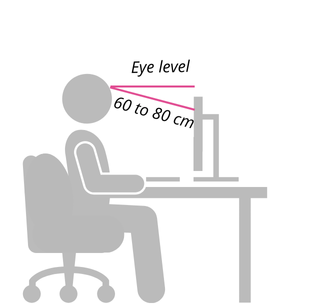
- Screen perpendicular to the window to avoid reflections
- Top edge of screen 5 to 10 cm below eye level
- Bottom edge of screen as close as possible to the table
- Eye-screen distance slightly longer than an arm's length (hand outstretched)
SEAT : “GYMBALL”
- Brings mobility
- Helps strengthen back and abdominal muscles
- Does not replace a chair
 TABLE : SIT-STAND DESK
- Usually motorized
- Allows easy alternation between sitting and standing positions
If you have any questions about these alternatives, or about other types of adapted equipment (vertical mouse, peripheral screen, etc.), please contact STEPS service : .
Your posture
TO AVOID :
 Curling up
Shrugging shoulders
Staying in the same position for hours
Corssing legs
 Sitting on the edge of the chair

TO APPLY :
 Respect the natural curves of the back
Relax shoulders
Change position : get up regularly
Feet flat on the ground (or on a footrest)
 Sit at the back of the chair
